A clipboard manager for Mac: With search, pins and one-key paste
- 14-day free trial
- $14.99 once, then $19
- macOS 14+
- No account
What is Clipboard History?
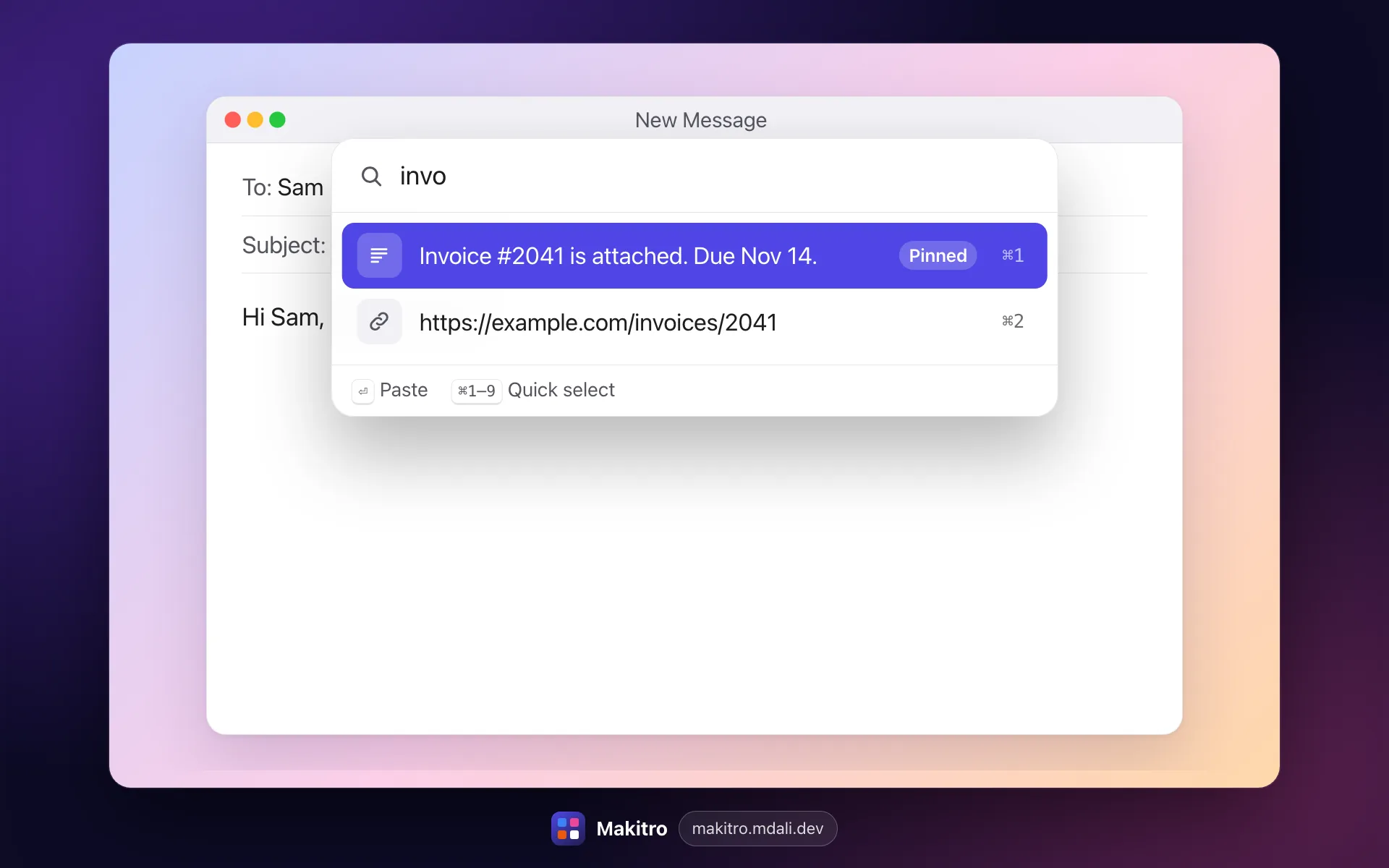
Clipboard History keeps what you copy on your Mac, so you can paste it again later. Press ⌃⌘V to search everything you copied: text, links and images. Pin the snippets you reuse, paste any of the first nine with ⌘1 to ⌘9, and the history never leaves your Mac. It runs on macOS 14 Sonoma and later.
Using Clipboard History
- Copy as you always do. Makitro keeps the newest 100 items by default; choose anywhere from 50 to 2,000.
- Press ⌃⌘V wherever you're typing to open the history, and type to search it.
- Choose an item, or press ⌘1 to ⌘9 for the first nine, and it's pasted where you were typing.
- Pin the snippets you reuse, so clearing the history keeps them.
- Pause history, or exclude an app, when you're copying something you'd rather not keep.
What makes Clipboard History different
Nothing leaves your Mac
There's no account and no sync. The history lives in a folder only your macOS user can read, and it's excluded from Time Machine.
Paste, not just copy
With Accessibility access, the item you choose lands where you were typing. Without it, Makitro copies the item and you press ⌘V yourself.
Delete means delete
Remove single items, clear everything unpinned, or delete it all. Deleted content is overwritten inside the database.
Passwords are skipped, not stored
Password managers mark what they copy as private. Makitro skips those items before their content is read, so they never reach the history.
Questions about Clipboard History
Want the whole story? Read the guide: How to see your clipboard history on a Mac.
Using Maccy? See how Makitro compares with Maccy.
Does the Mac have a clipboard history built in?
Since macOS 26 Tahoe, Spotlight can show recent copies: it's off by default, and keeps items for up to 7 days. Earlier versions keep only the last thing you copied. Makitro works from macOS 14, keeps up to 2,000 items until you clear them, and adds pins, ⌘1–⌘9 and password skipping.
How do I see what I copied on my Mac?
With Makitro running, press ⌃⌘V. The panel lists everything you copied, newest first, with a search field at the top. Choose an item to paste it.
Does it save images?
Yes. Images are kept with a small thumbnail, up to the 50 newest unpinned ones. You can turn saving images off. Files, PDFs and very large images aren't recorded.
Is my clipboard sent anywhere?
No. Clipboard contents never leave your Mac, are never logged, and Makitro has no analytics. The only connection Makitro makes is the update check, which you can turn off in Settings.
Can I keep it from recording one app?
Yes. Add the app to the excluded apps list in Clipboard settings, or pause history from the panel. Nothing copied while paused or from an excluded app is recorded.
Get Clipboard History and the rest of Makitro
One download for all eight tools. Turn on only what you use: a tool that's off runs nothing.